Gnim
While GTK has its own templating system, it lacks in the DX department. Blueprint tries to solve this, but it is still not as convenient as JSX. Gnim aims to bring the kind of developer experience to GJS that libraries like React and Solid offer for the web.
Gnim is not React
While some concepts are the same, Gnim has nothing in common with React other than the JSX syntax.
Scopes
Before jumping into JSX, you have to understand the concept of scopes first. A scope's purpose in Gnim is to collect cleanup functions and hold context values.
A scope is essentially an object that synchronously executed code has access to.
let scope: Scope | null = null

function printScope() {
  print(scope)
}

function nested() {
  printScope() // scope

  setTimeout(() => {
    // this block of code gets executed after the last line
    // at which point scope no longer exists
    printScope() // null
  })
}

function main() {
  printScope() // scope
  nested()
}

scope = new Scope()

// at this point synchronously executed code can access scope
main()

scope = null
The reason we need scopes is so that Gnim can cleanup any kind of gobject connection, signal subscription and effect.
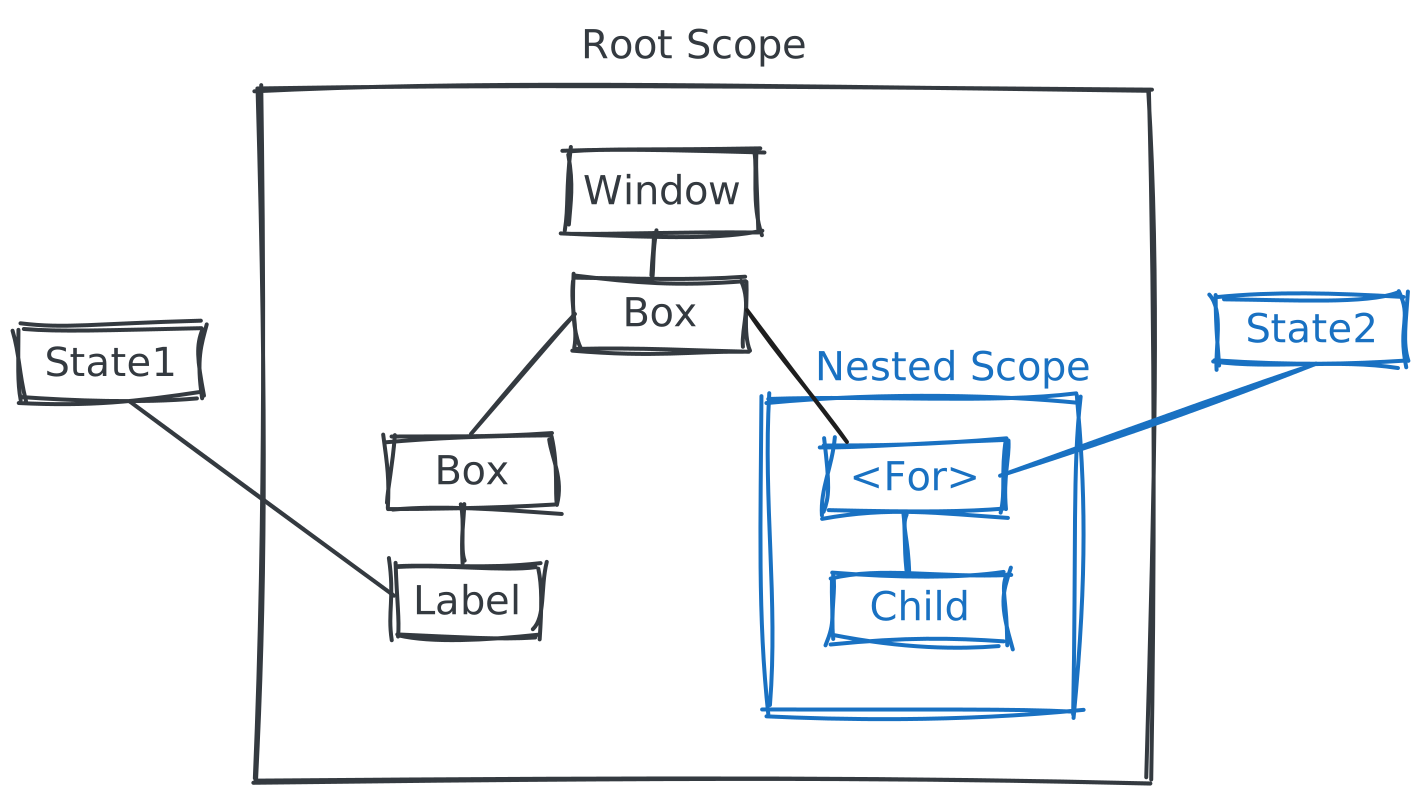
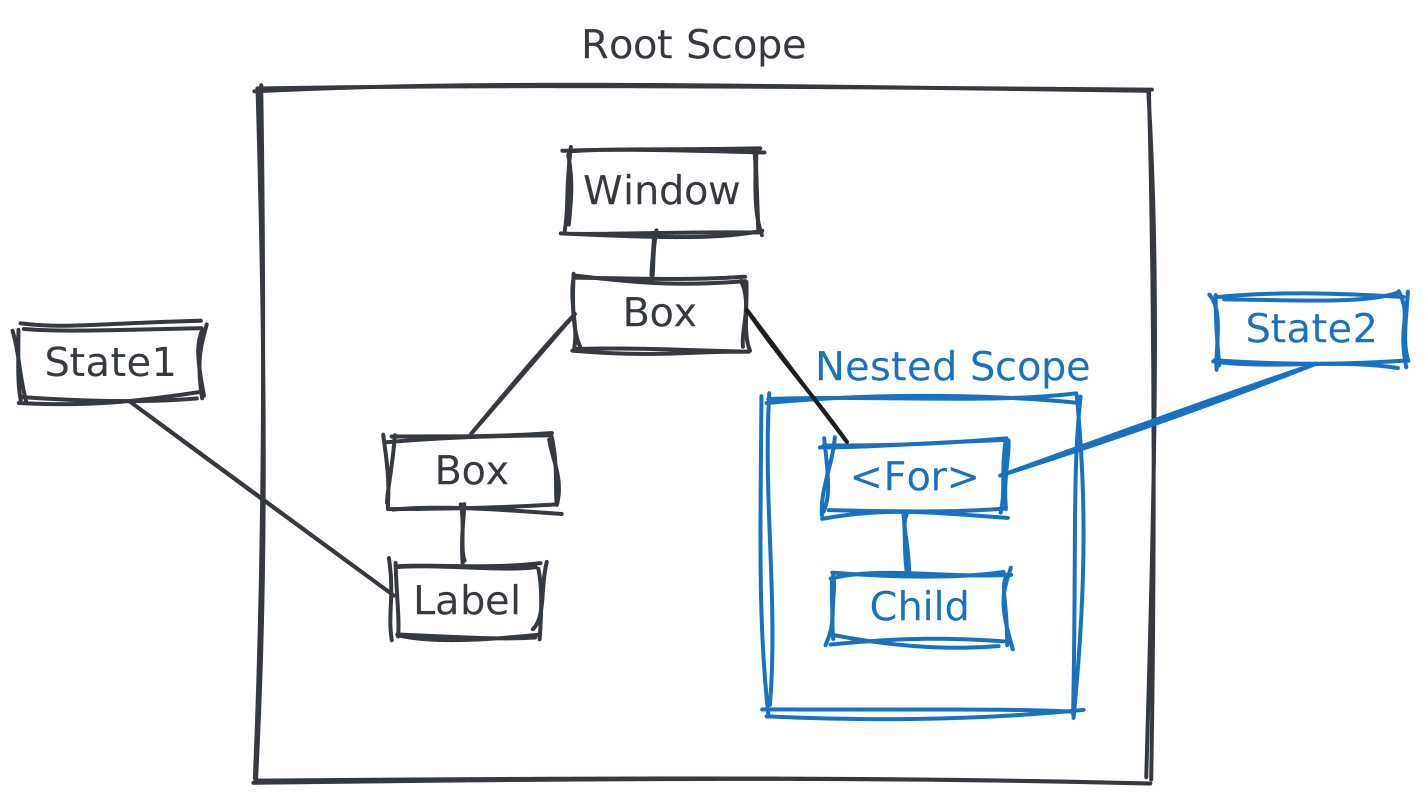
In this example we want to render a list based on State2. It is accomplished by running each Child in their own scope so that when they need to be removed we can just cleanup the scope. This behaviour also cascades: if the root scope were to be cleaned up the nested scope would also be cleaned up as a result.
Gnim manages scopes for you, the only scope you need to take care of is the root, which is usually tied to a window or the application.
import { createRoot } from "gnim"

const win = createRoot((dispose) => {
  const win = new Gtk.Window()
  win.connect("close-request", dispose)
  return win
})import { createRoot } from "gnim"
class App extends Gtk.Application {
vfunc_activate() {
createRoot((dispose) => {
this.connect("shutdown", dispose)
new Gtk.Window()
})
}
}To attach a cleanup function to the current scope, simply use onCleanup.
import { onCleanup } from "gnim"

function fn() {
  onCleanup(() => {
    console.log("scope cleaned up")
  })
}
JSX Markup
JSX is a syntax extension to JavaScript. It is simply a syntactic sugar for function composition. In Gnim, JSX is also used to enhance GObject construction.
Creating and nesting widgets
function MyButton() {
  return (
    <Gtk.Button onClicked={(self) => console.log(self, "clicked")}>
      <Gtk.Label label="Click me!" />
    </Gtk.Button>
  )
}
Now that you have declared MyButton, you can nest it into another component.
function MyWindow() {
  return (
    <Gtk.Window>
      <Gtk.Box>
        Click The button
        <MyButton />
      </Gtk.Box>
    </Gtk.Window>
  )
}
Notice that widgets start with a capital letter. Lower case widgets are intrinsic elements
Displaying Data
JSX lets you put markup into JavaScript. Curly braces let you “escape back” into JavaScript so that you can embed some variable from your code and display it.
function MyButton() {
  const label = "hello"

  return <Gtk.Button>{label}</Gtk.Button>
}
You can also pass JavaScript to markup properties.
function MyButton() {
  const label = "hello"

  return <Gtk.Button label={label} />
}
Conditional Rendering
You can use the same techniques as you use when writing regular JavaScript code. For example, you can use an if statement to conditionally include JSX:
function MyWidget() {
  let content

  if (condition) {
    content = <True />
  } else {
    content = <False />
  }

  return <Gtk.Box>{content}</Gtk.Box>
}
You can also inline a conditional ? (ternary) expression.
function MyWidget() {
  return <Gtk.Box>{condition ? <True /> : <False />}</Gtk.Box>
}
When you don’t need the else branch, you can also use a shorter logical && syntax:
function MyWidget() {
  return <Gtk.Box>{condition && <True />}</Gtk.Box>
}
TIP
falsy values are not rendered and are simply ignored.
Rendering lists
You can use for loops or array map() function.
function MyWidget() {
  const labels = ["label1", "label2", "label3"]

  return (
    <Gtk.Box>
      {labels.map((label) => (
        <Gtk.Label label={label} />
      ))}
    </Gtk.Box>
  )
}
Widget signal handlers
You can respond to events by declaring event handler functions inside your widget:
function MyButton() {
  function onClicked(self: Gtk.Button) {
    console.log(self, "was clicked")
  }

  return <Gtk.Button onClicked={onClicked} />
}
How properties are passed
Using JSX, a custom widget will always have a single object as its parameter.
type Props = {
  myprop: string
  children?: JSX.Element | Array<JSX.Element>
}

function MyWidget({ myprop, children }: Props) {
  //
}
TIP
JSX.Element is an alias to GObject.Object
The children property is a special one which is used to pass the children given in the JSX expression.
// `children` prop of MyWidget is the Box
return (
  <MyWidget myprop="hello">
    <Gtk.Box />
  </MyWidget>
)// `children` prop of MyWidget is [Box, Box]
return (
<MyWidget myprop="hello">
<Gtk.Box />
<Gtk.Box />
</MyWidget>
)State management
State is managed using reactive values (also known as signals or observables in some other libraries) through the Accessor class. The most common primitives you will use is createState, createBinding and createComputed. createState is a writable reactive value, createBinding is used to hook into GObject properties and createComputed is used to derive values.
import { createState } from "gnim"

function Counter() {
  const [count, setCount] = createState(0)

  function increment() {
    setCount((v) => v + 1)
  }

  const label = count((num) => num.toString())

  return (
    <Box>
      <Label label={label} />
      <Button onClicked={increment}>Click to increment</Button>
    </Box>
  )
}import GObject, { register, property } from "gnim/gobject"
import { createBinding } from "gnim"
@register()
class CountStore extends GObject.Object {
@property(Number) counter = 0
}
function Counter() {
const count = new CountStore()
function increment() {
count.counter += 1
}
const counter = createBinding(count, "counter")
const label = counter((num) => num.toString())
return (
<Box>
<Label label={label} />
<Button onClicked={increment}>Click to increment</Button>
</Box>
)
}Accessors can be called as a function which lets you transform its value. In the case of a Gtk.Label in this example, its label property expects a string, so it needs to be turned into a string first.
Dynamic rendering
When you want to render based on a value, you can use the <With> component.
import { With, Accessor } from "gnim"

let value: Accessor<{ member: string } | null>

return (
  <Box>
    <With value={value}>
      {(value) => value && <Label label={value.member} />}
    </With>
  </Box>
)
TIP
In a lot of cases it is better to always render the component and set its visible property instead.
WARNING
When the value changes and the widget is re-constructed, the previous one is removed from the parent component and the new one is appended. Order of widgets are not kept, so make sure to wrap <With> in a container to avoid it. This is due to Gtk not having a generic API on containers to sort widgets.
Dynamic list rendering
The <For> component let's you render based on an array dynamically. Each time the array changes it is compared with its previous state. Widgets for new items are inserted while widgets associated with removed items are removed.
import { For, Accessor } from "gnim"

let list: Accessor<Array<any>>

return (
  <Box>
    <For each={list}>
      {(item, index: Accessor<number>) => (
        <Label label={index.as((i) => `${i}. ${item}`)} />
      )}
    </For>
  </Box>
)
WARNING
Similarly to <With>, when the list changes and a new item is added, it is simply appended to the parent. Order of sibling widgets are not kept, so make sure to wrap <For> in a container to avoid this.
Effects
Effects are functions that run when state changes. It can be used to react to value changes and run side-effects such as async tasks, logging or writing Gtk widget properties directly. In general, an effect is considered something of an escape hatch rather than a tool you should use frequently. In particular, avoid using it to synchronise state. See when not to use an effect for alternatives.
The createEffect primitive runs the given function tracking reactive values accessed within and re-runs it whenever any of its dependencies change.
const [count, setCount] = createState(0)
const [message, setMessage] = createState("Hello")

createEffect(() => {
  console.log(count(), message())
})

setCount(1) // Output: 1, "Hello"
setMessage("World") // Output: 1, "World"
If you wish to read a value without tracking it as a dependency you can use the .peek() method.
createEffect(() => {
  console.log(count(), message.peek())
})

setCount(1) // Output: 1, "Hello"
setMessage("World") // nothing happens
Nested effects
When working with effects, it is possible to nest them within each other. This allows each effect to independently track its own dependencies, without affecting the effect that it is nested within.
createEffect(() => {
  console.log("Outer effect")
  createEffect(() => console.log("Inner effect"))
})
The order of execution is important to note. An inner effect will not affect the outer effect. Signals that are accessed within an inner effect, will not be registered as dependencies for the outer effect. When the signal located within the inner effect changes, it will trigger only the inner effect to re-run, not the outer one.
createEffect(() => {
  console.log("Outer effect")
  createEffect(() => {
    // when count changes, only this effect will re-run
    console.log(count())
  })
})
Root effects
If you wish to create an effect in the global scope you have to manage its life-cycle with createRoot.
const globalObject: GObject.Object

const field = createBinding(globalObject, "field")

createRoot((dispose) => {
  createEffect(() => {
    console.log("field is", field())
  })

  dispose() // effect should be cleaned up when no longer needed
})
When not to use an effect
Do not use an effect to synchronise state.
const [count, setCount] = createState(1)
const [double, setDouble] = createState(count() * 2)
createEffect(() => {
  setDouble(count() * 2)
})
const double = createComputed(() => count() * 2)
Same logic applies when an Accessor is passed as a prop.
function Counter(props: { count: Accessor<number> }) {
  const [double, setDouble] = createState(props.count() * 2)
  createEffect(() => {
    setDouble(props.count() * 2)
  })
  const double = createComputed(() => props.count() * 2)
}
Do not use an effect to track values from GObject signals.
const [count, setCount] = createState(1)
const id = gobject.connect("signal", () => {
  setCount(gobject.prop)
})
onCleanup(() => gobject.disconnect(id))
const count = createConnection(0, [gobject, "signal", () => gobject.prop])
Avoid using an effect for event specific logic.
function TextEntry() {
  const [url, setUrl] = createState("")
  createEffect(() => {
    fetch(url())
  })

  function onTextEntered(entry: Gtk.Entry) {
    setUrl(entry.text)
    fetch(url.peek())
  }
}